
Web UI parity and v1 adaptations
The v1 Web client reuses the 0.x visual language and the 0.x interactions that v1 services support. It does not restore the old monolith's API, and it does not guess data that a service doesn't return. This page lists each 0.x surface, what v1 shows today, and each 0.x endpoint that still has no v1 route.
The visual baseline is the 0.x web app on the dev branch. The v1 client keeps that app's shell and shared components and fills them with v1 service data. When you compare the two, compare the routes that each app mounts, not only the retained source files.
Paths on this page that start with /api/v1 are public Gateway paths. Paths that start with /api are 0.x paths.
Structure
The 0.x rail is the same in every version. Shared parts keep one shape when their data source changes:
| Shared part | Used by |
|---|---|
RunList | Overview, Sessions, Dashboard, Orchestrations, Flow, Observability, Diagnostics, and Heartbeat, on the project run list |
DecisionView | Run Approvals tab |
AttentionList | Overview, Flow, and the notification bell, on your notifications |
NewChatComposer | Run Chat tab and the New session page |
CaptureTaskForm | Board Intake and the Start task dialog |
ProjectMetricsSections | Dashboard, Overview, and Observability, on project metrics and usage |
PlatformComponentsSection | Platform settings, Diagnostics, and Cluster, on the platform component report |
PlatformComponentsTable | Run settings tab |
Run state words are the same everywhere: Needs input, Open, Working, and Done. Unavailable means the service did not return a state. It does not mean the run failed.
The UI says platform component for a replaceable platform area and implementation for the provider in use.
flowchart LR
  signin[Sign in] --> overview[Overview]
  overview --> chief[Chief of Staff]
  chief --> priorities[Priorities]
  chief --> newchat[New chat]
  chief --> conversations[My conversations]
  overview --> projects[Projects]
  overview --> sessions[Sessions]
  overview --> attention[Needs attention]
  bell[Notification bell] --> attention
  sessions --> newsession[New session]
  newsession --> chat[Chat]
  projects --> dashboard[Project dashboard]
  dashboard --> orch[Orchestrations]
  dashboard --> agents[Agents]
  agents --> cast[Cast a team]
  orch --> run[Run page]
  sessions --> run
  attention --> decision[Decision view]
  dashboard --> board[Board]
  attention --> board
  starttask[Start task] --> board
  run --> decision
  run --> chat
  dashboard --> ops[Flow, Workflows, Workspace, Observability, Diagnostics, Heartbeat, Cluster]
  ops --> run
  ops --> board
  dashboard --> settings[Project settings]
The Overview groups Priorities, New chat, and My conversations under Chief of Staff. A v1-only rail link opens that section; 0.x navigation is unchanged. The active Overview and Dashboard use published Gateway reads. Overview lists the four most recently updated active projects and reads their configuration, metrics, and backlog. Its Operations card keeps the 0.x totals, but in-flight, queued-work, and done-today values are unavailable because GET /api/v1/overview is not published. The same route is needed for the old aggregate metrics, usage, service health, and full activity feed. Overview therefore shows metrics for one selected project and recent run summaries rather than global activity. Dashboard reads GET /api/v1/projects/{projectId}, GET /api/v1/projects/{projectId}/configuration, GET /api/v1/projects/{projectId}/runs, GET /api/v1/projects/{projectId}/metrics, and GET /api/v1/projects/{projectId}/usage for its summary, setup checks, team, recent runs, selected range, model and per-agent usage panels, and quick actions. Neither page calls the old global overview or project dashboard endpoint. The notification bell and project switcher use the same published Gateway routes. When a read fails, its value is unavailable, not zero or healthy.
Page comparison checklist
Use the mounted 0.x pages as the reference. Compare at the same viewport and with the same project, active run, agent, and model fixture. Each app renders only fields its API provides. The screenshots compare layout and data gaps; they are not live acceptance evidence and do not claim pixel parity.
| Page | 0.x section order and density | Card, table, and detail treatment | Controls and navigation | v1 data and gaps |
|---|---|---|---|---|
| Overview | Operations, Recent projects, AI usage & performance, then Activity feed beside Needs attention. Recent projects shows one current-focus panel and up to four compact project rows. | One Operations card has a health badge and four counters. The project area is a split focus/list card. Five small usage cards follow. Activity and attention use bordered panels; there is no detail drawer or data table. | Refresh, automatic refresh every 10 seconds while mounted, a 7-, 30-, or 90-day range, View all projects, project links, and attention actions. The project list becomes one column below 900px; the lower panels stack below 980px. The approved v1-only Chief of Staff group appears before these sections. | Project card Issues counts only non-archived tasks linked to repository issues; other card stats use configuration and metrics. Operations keeps the four 0.x counters; only Active projects is measurable. GET /api/v1/overview is missing for the other totals, global health, aggregate usage, and full activity. v1 selects one project for metrics and shows recent run summaries. |
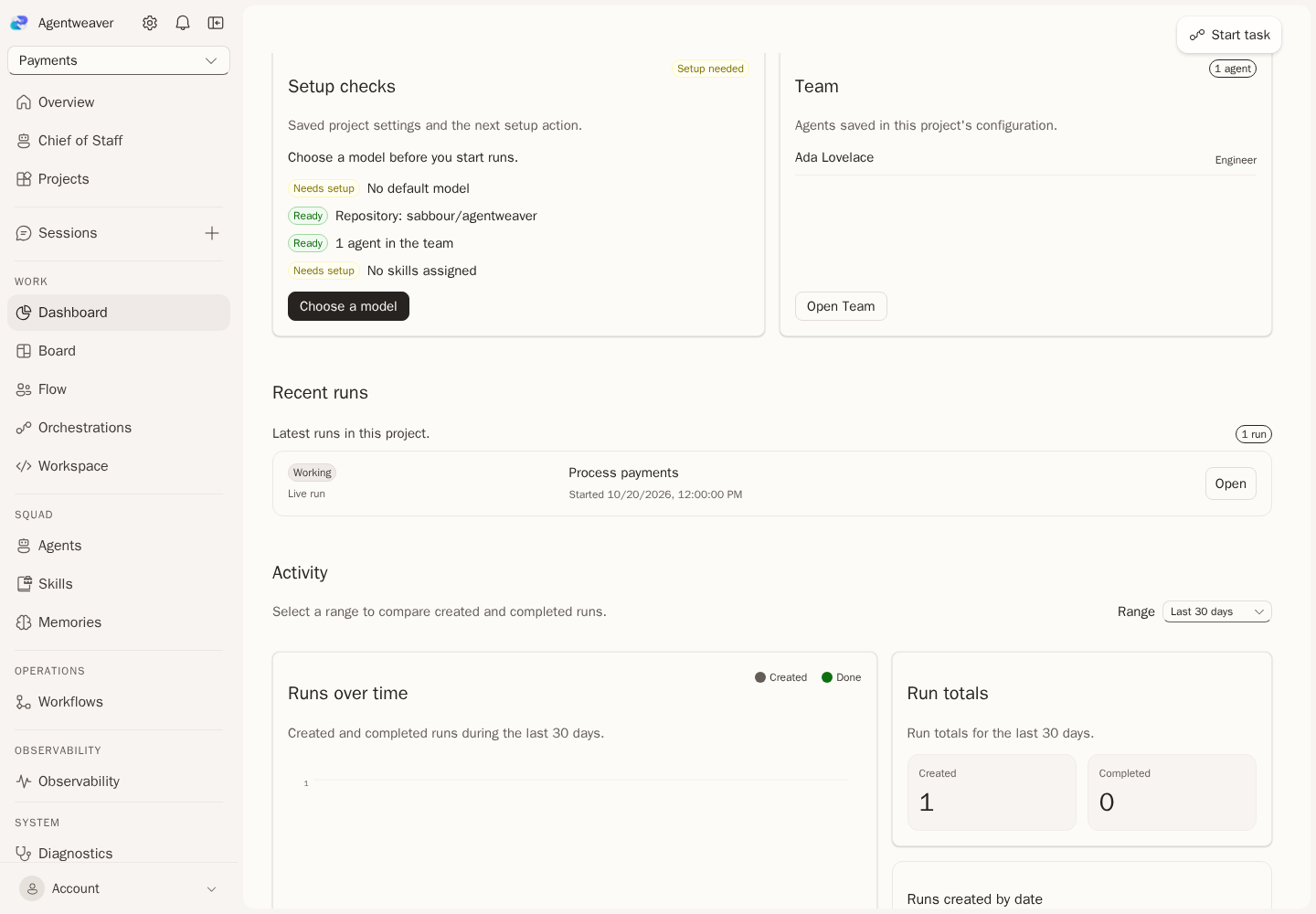
| Dashboard | Status and four summary tiles lead; Setup checks and Team follow; Recent runs link to run details; Activity range controls and charts come next; model and agent panels finish the page. | The status card pairs project state and next actions with four metric tiles. Setup checks link to saved model, repository, team, and skills settings. Team and recent runs use compact lists. Activity uses a bordered chart and run-total panel. Model and per-agent usage use tables; unavailable agent scores and response percentiles stay explicit. There is no detail drawer. | Refresh and automatic refresh; 7-, 30-, and 90-day range selector; setup links, Team navigation, direct run links, and status-based links to Board, Flow, Orchestrations, or settings for archived projects. The header shows the current project role when the owner returns it. The activity columns stack below 980px. | Project summary, configuration, run-list, metrics, and usage routes supply the supported panels. A failed separate weekly-count request leaves only that tile unavailable. Live health needs GET /api/v1/projects/{projectId}/health; task completions need GET /api/v1/projects/{projectId}/task-metrics; the leaderboard needs GET /api/v1/projects/{projectId}/agent-metrics; response percentiles need the responseDuration and timeToFirstToken fields on GET /api/v1/projects/{projectId}/metrics. |
Matched screenshots
These captures use the same 1440 by 1000 viewport and equivalent fixture data. They show layout and data gaps; they are not live acceptance evidence and do not claim pixel parity.
| Page section | 0.x baseline | v1 |
|---|---|---|
| Overview, top | 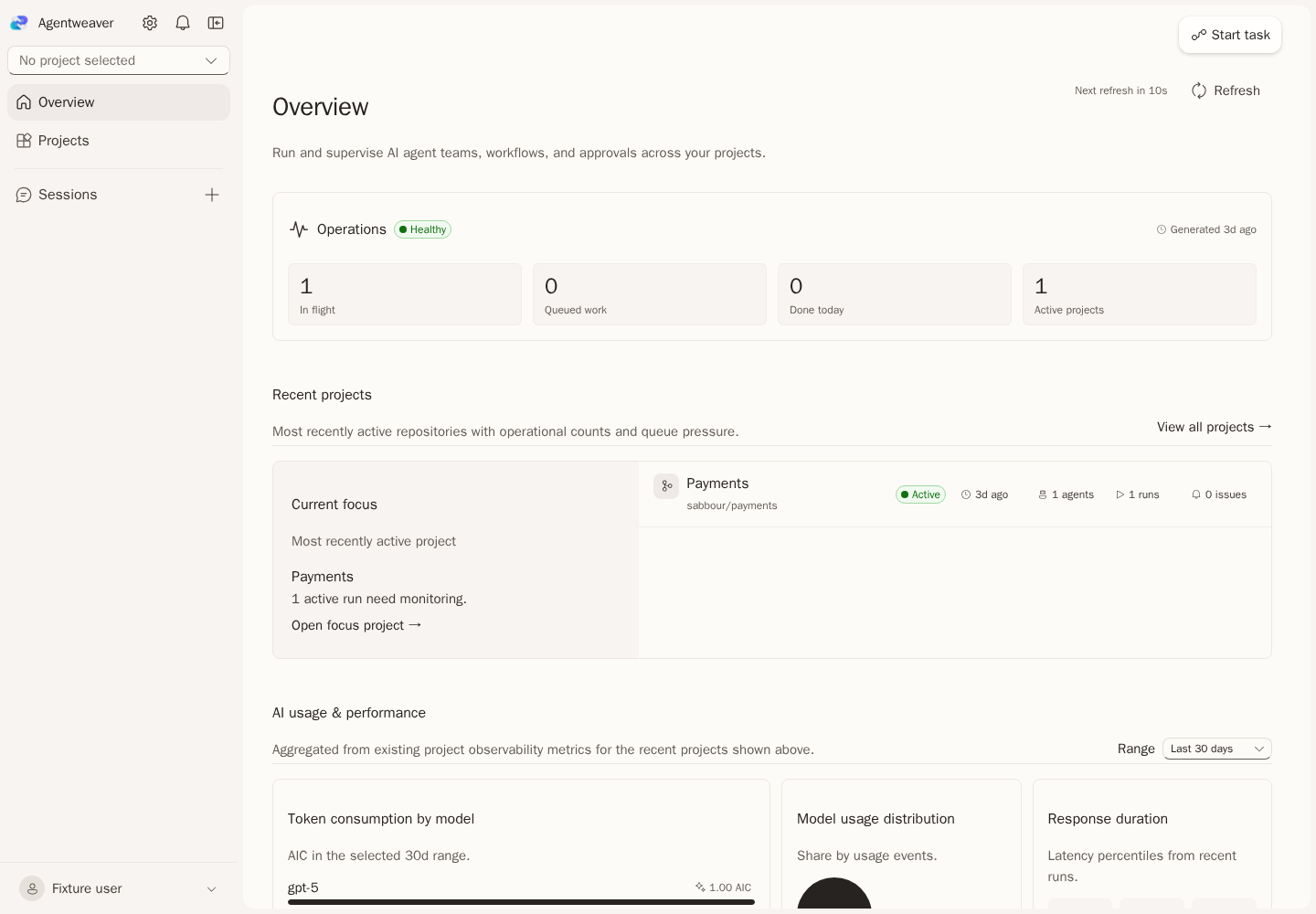 | 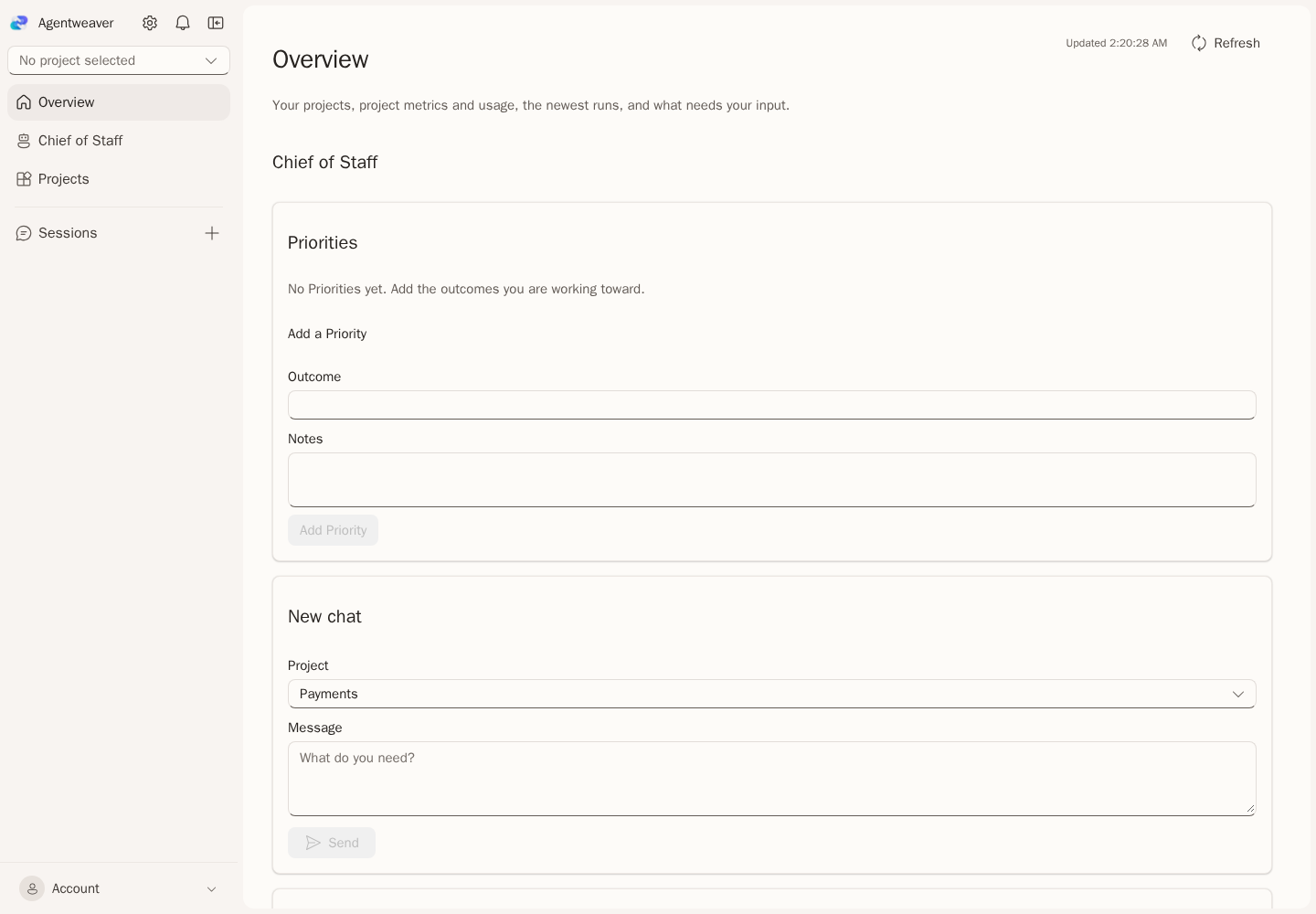 |
| Overview, Operations | 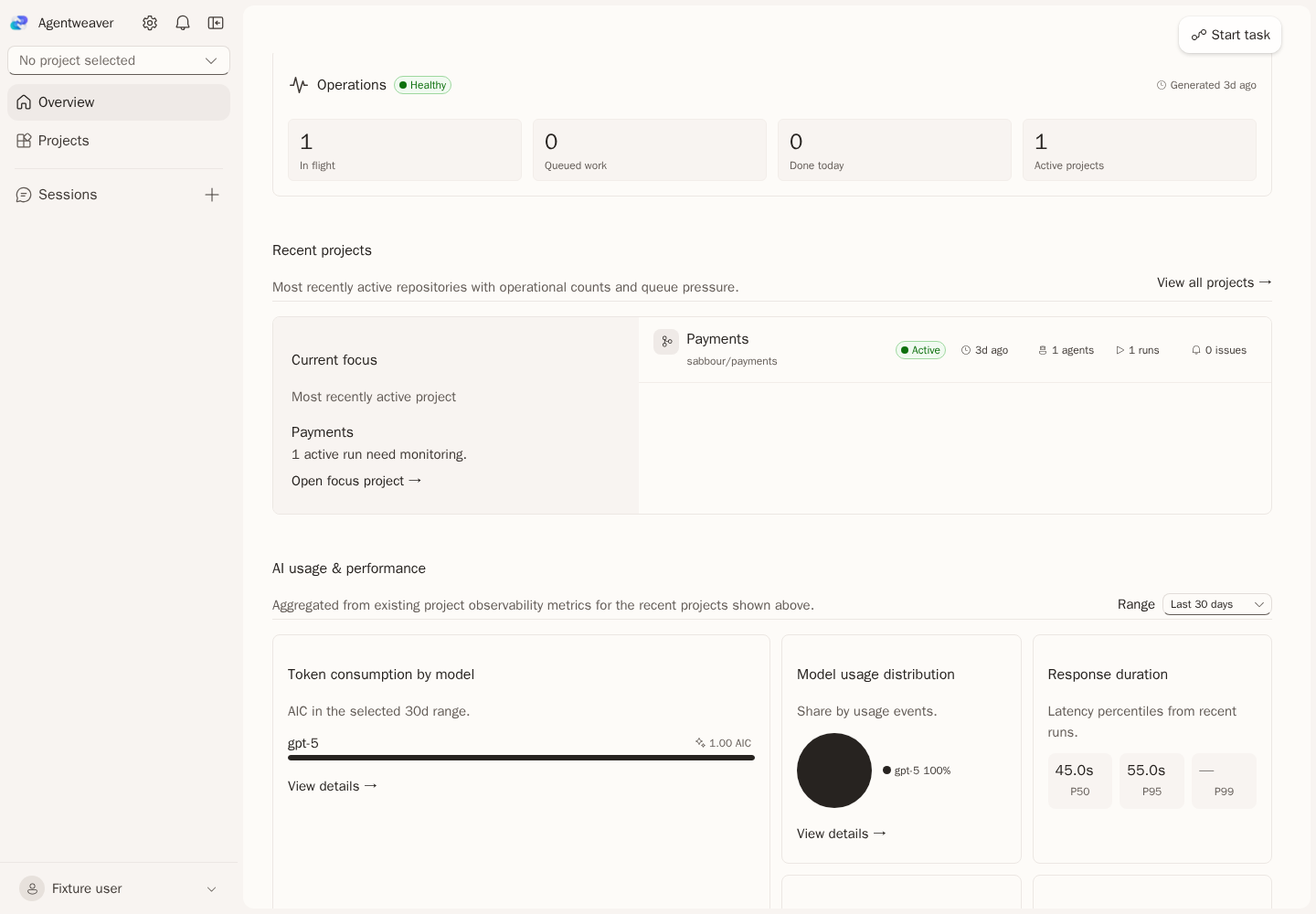 | 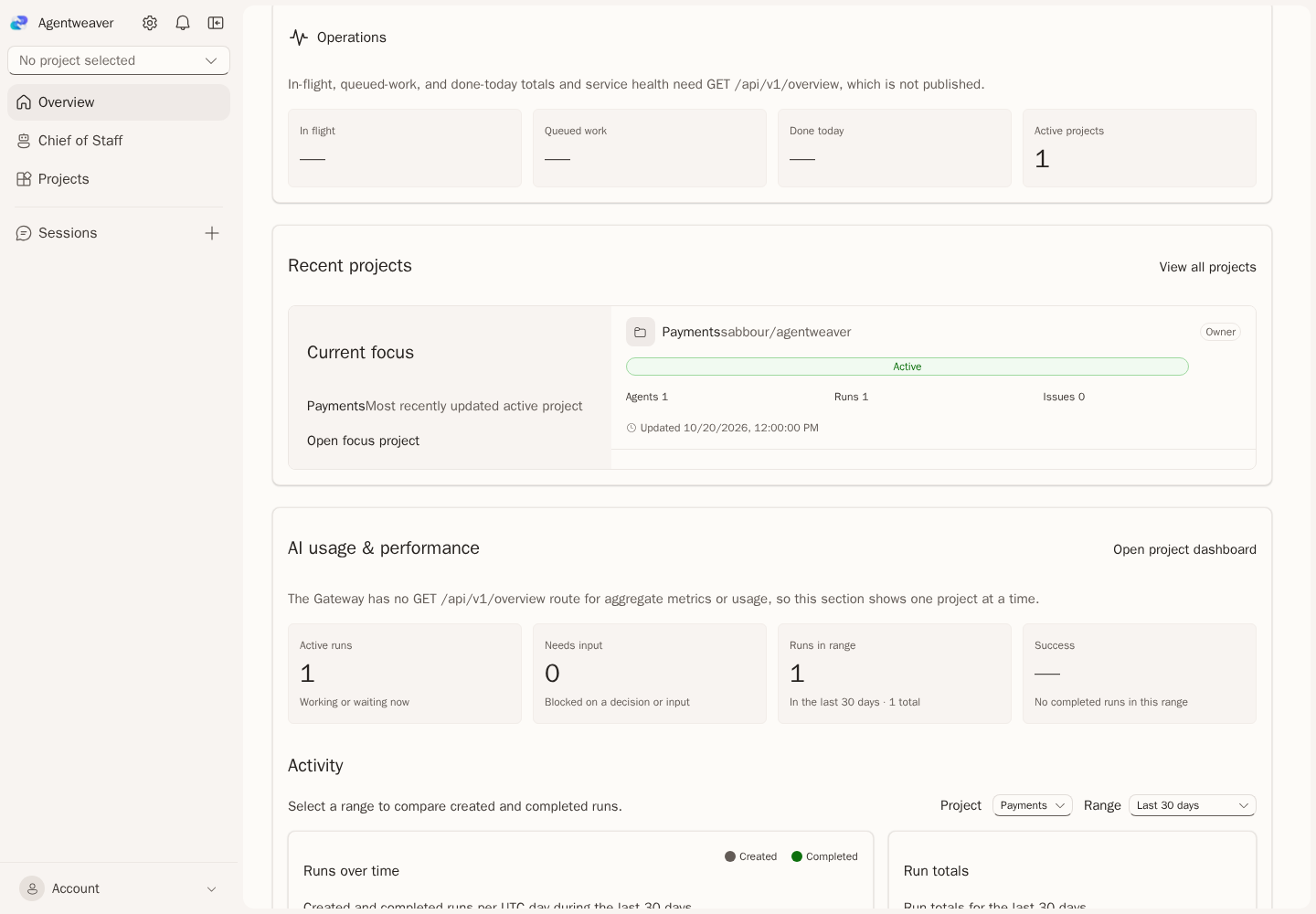 |
| Overview, activity | 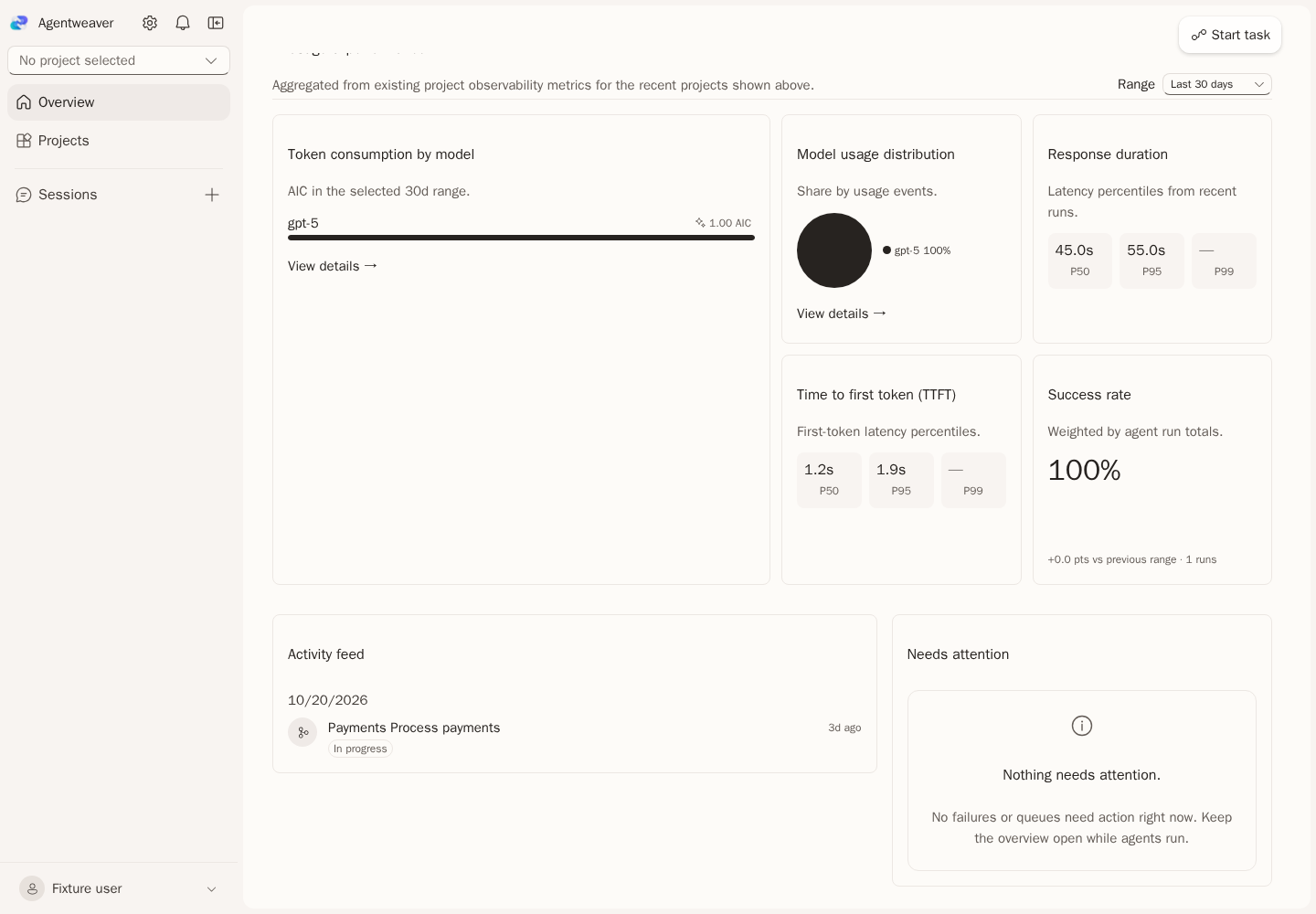 | 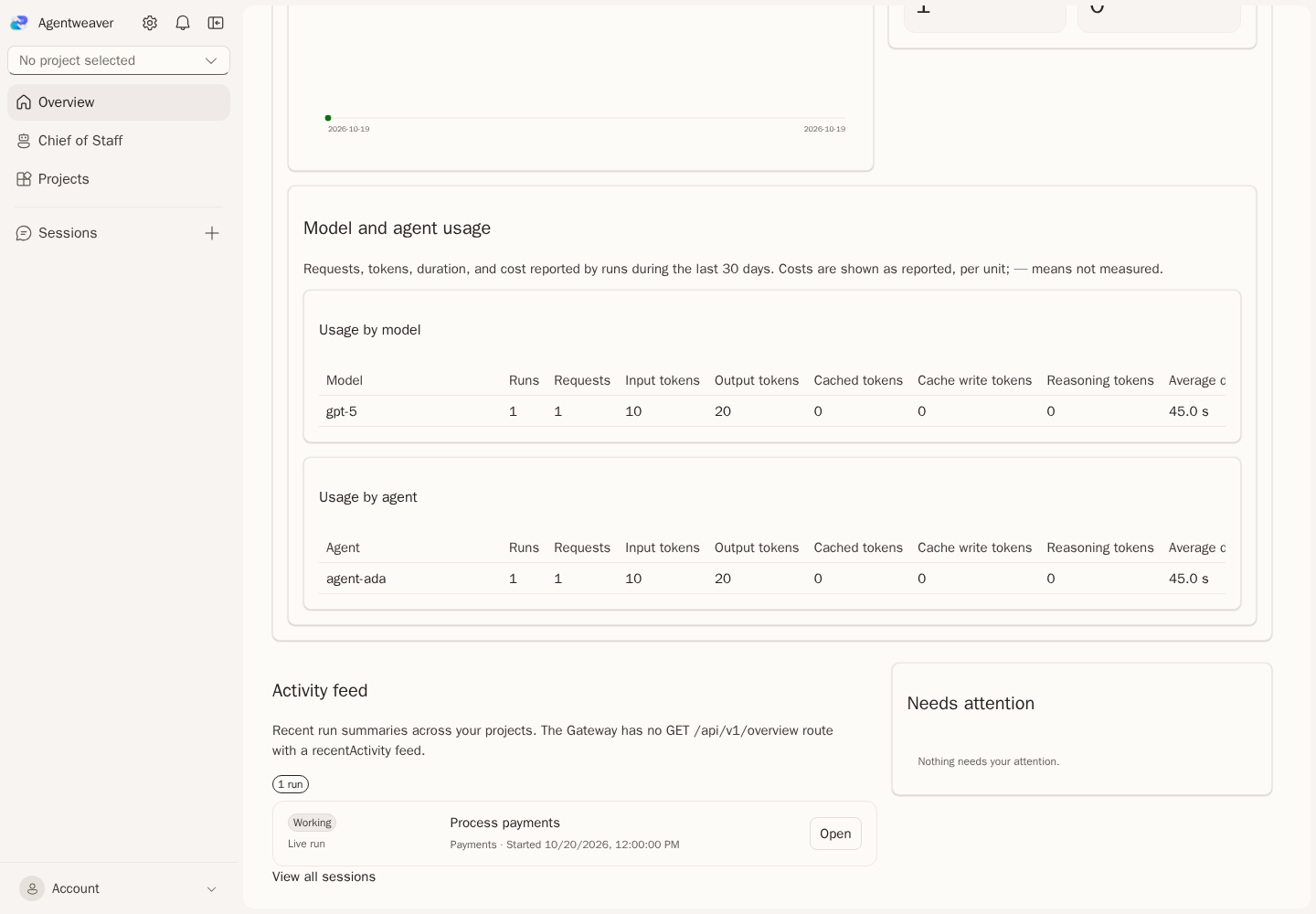 |
| Dashboard, top | 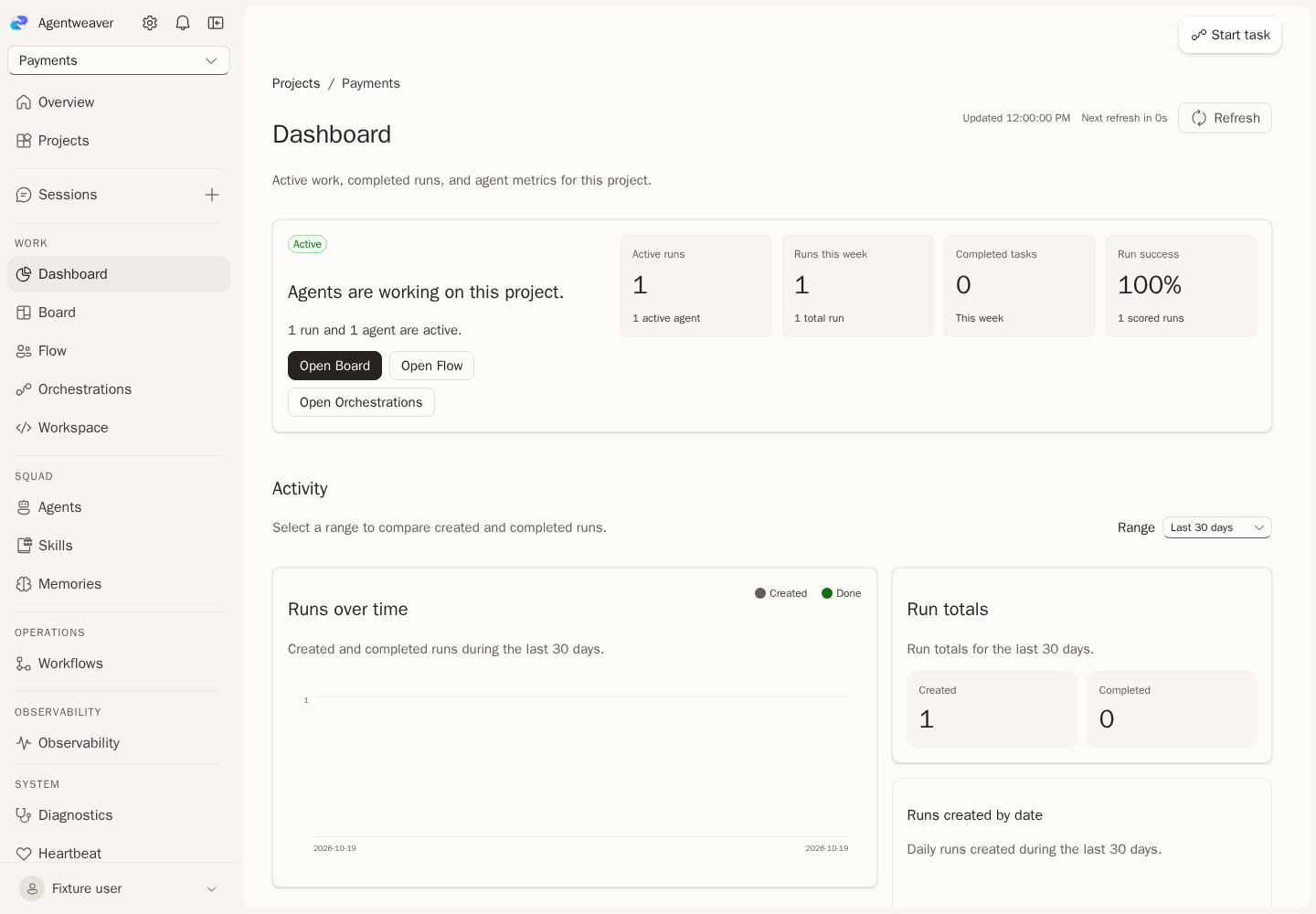 | 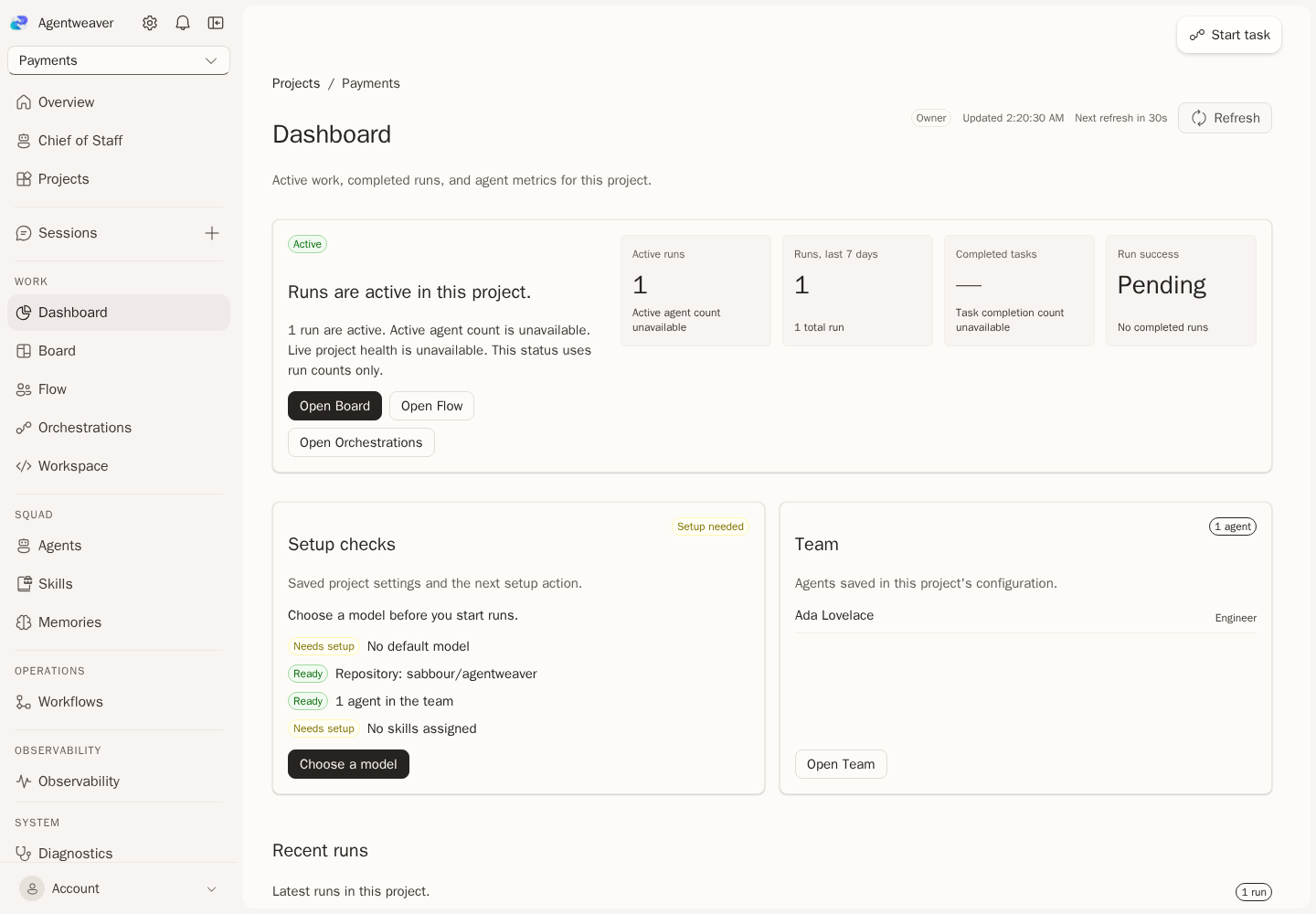 |
| Dashboard, model metrics | 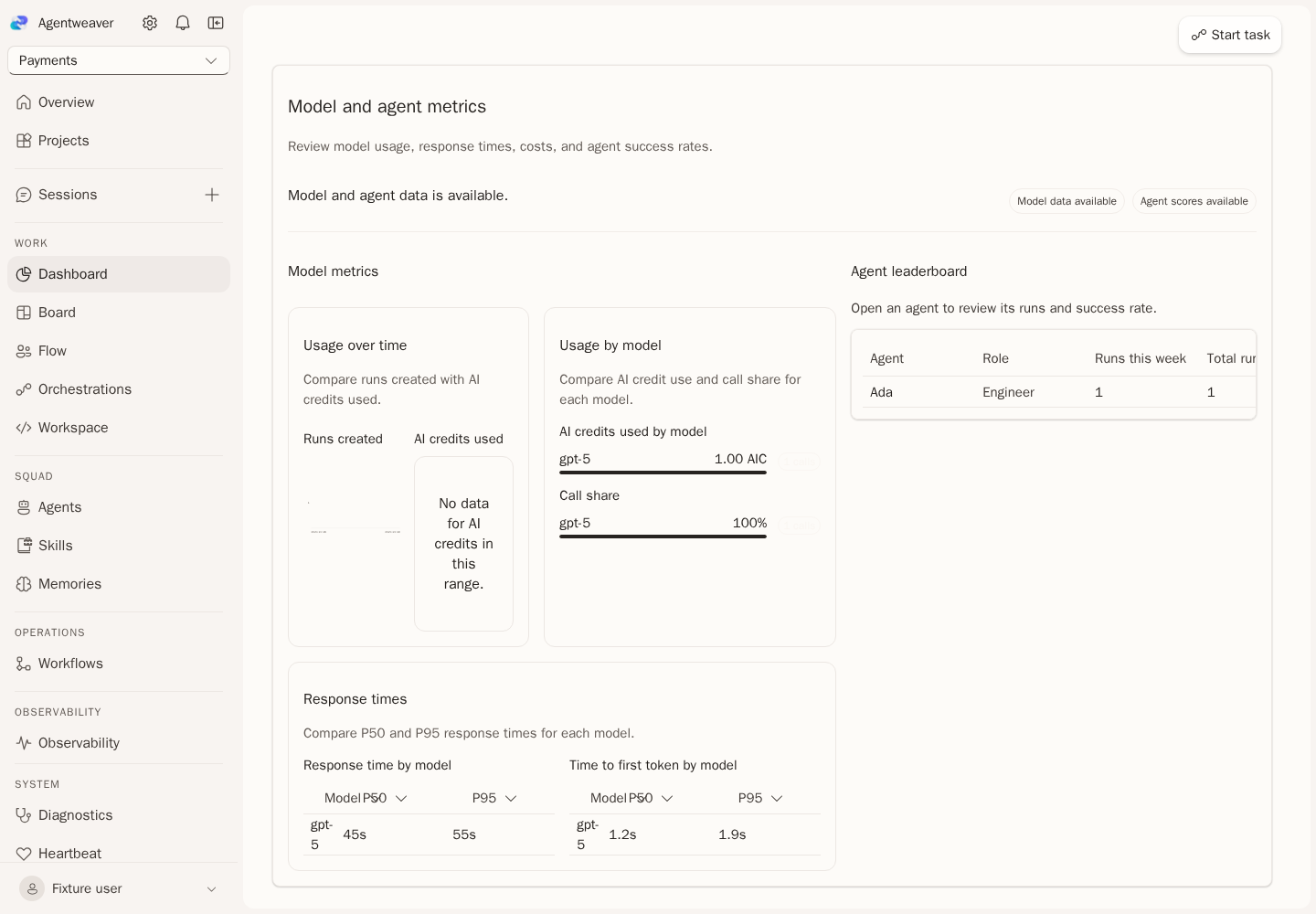 | 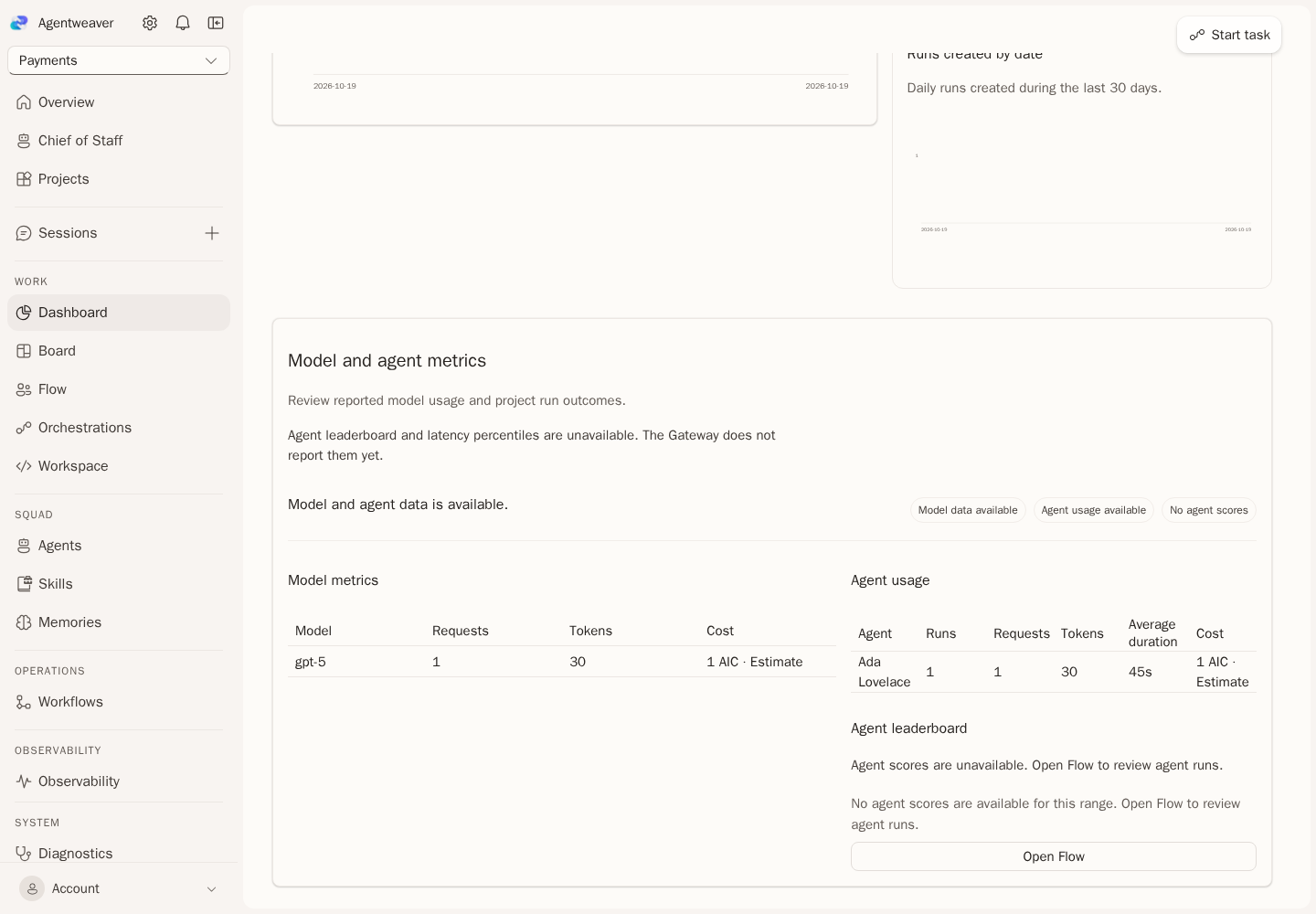 |
The restored setup, Team, and recent-run panels are also shown in a v1 supporting capture:
Surfaces
Each row says what works and what is still missing. The missing parts link to Endpoint gaps, which names the exact routes.
| 0.x surface | Works in v1 | Missing |
|---|---|---|
| Sign-in | Broker sign-in in the 0.x card. | Nothing. |
| Consent | Permission explanations in the sign-in card. | Nothing. |
| Shell and breadcrumbs | 0.x rail with Overview, the v1-only Chief of Staff section link, Projects, and Sessions, the New session button, project switcher, persona menu, and Projects / project / page breadcrumbs. Project pages list Flow, Workflows, Workspace, Observability, Diagnostics, Heartbeat, and Cluster. | Nothing. |
| Notification bell | Your notifications across projects, with the pending count, links to the run Approvals tab or the Board, and Dismiss. | Nothing. |
| Overview | Chief of Staff group with Priorities, New chat, and My conversations; the 0.x Operations tiles; four recent project rows; metrics and usage for one chosen project; recent run summaries; and Needs attention. Missing global totals and full activity are named in the page. | Cross-project totals, aggregate metrics and usage, service health, and the full activity feed from GET /api/v1/overview. |
| Sessions | Runs across your projects, newest first, with Load more, Refresh, and New session. | Nothing. |
| New session | /assistant picks a project, creates the run with the first message, signs in silently for that run, starts it, and opens Chat. | A run without a project (operator assistant). |
| Start task | Floating Start task button. Its dialog captures a task into the Backlog and opens the Board. | Nothing. |
| Projects gallery | 0.x tiles with state and your access. | Nothing. |
| Create blank project | Dialog with a project name. | Nothing. |
| Create from GitHub | Creates the project, then saves the repository with GitHub App sign-in. | Owner grant on create (behavior limit). |
| Dashboard | Run-based status and metric tiles, saved setup checks and next actions, archived-project guidance, recent runs with direct links, Team, Activity chart, run totals, model usage, and per-agent usage. Unavailable values are named instead of filled with guesses. | Live project health, completed-task counts, agent leaderboard scores, and response-duration percentiles. |
| Orchestrations | Active and Recent sections with Load more, a state summary, and Refresh. | Run delete and archive. |
| Run page | Two-pane layout with status strip, Run tree, and tabs Chat, Topology, Approvals, Activity, Changes, Usage, and Run settings. Stop run while the run is open. | Terminal diagnostic and retry. |
| Run Chat | Journal and a composer for the coordinator or the selected session. | Nothing. |
| Run Approvals | Shared decision view that rereads each gate before acting. | Nothing. |
| Run Changes | GitHub App repository access for the run, and Produced files: saved file sets, newest first, with Browse files, the 0.x file viewer, Show changes with the 0.x diff viewer, Refresh, and Load older file sets. | Nothing. |
| Run settings | Model, revisions, and implementations for each platform component. | Nothing. |
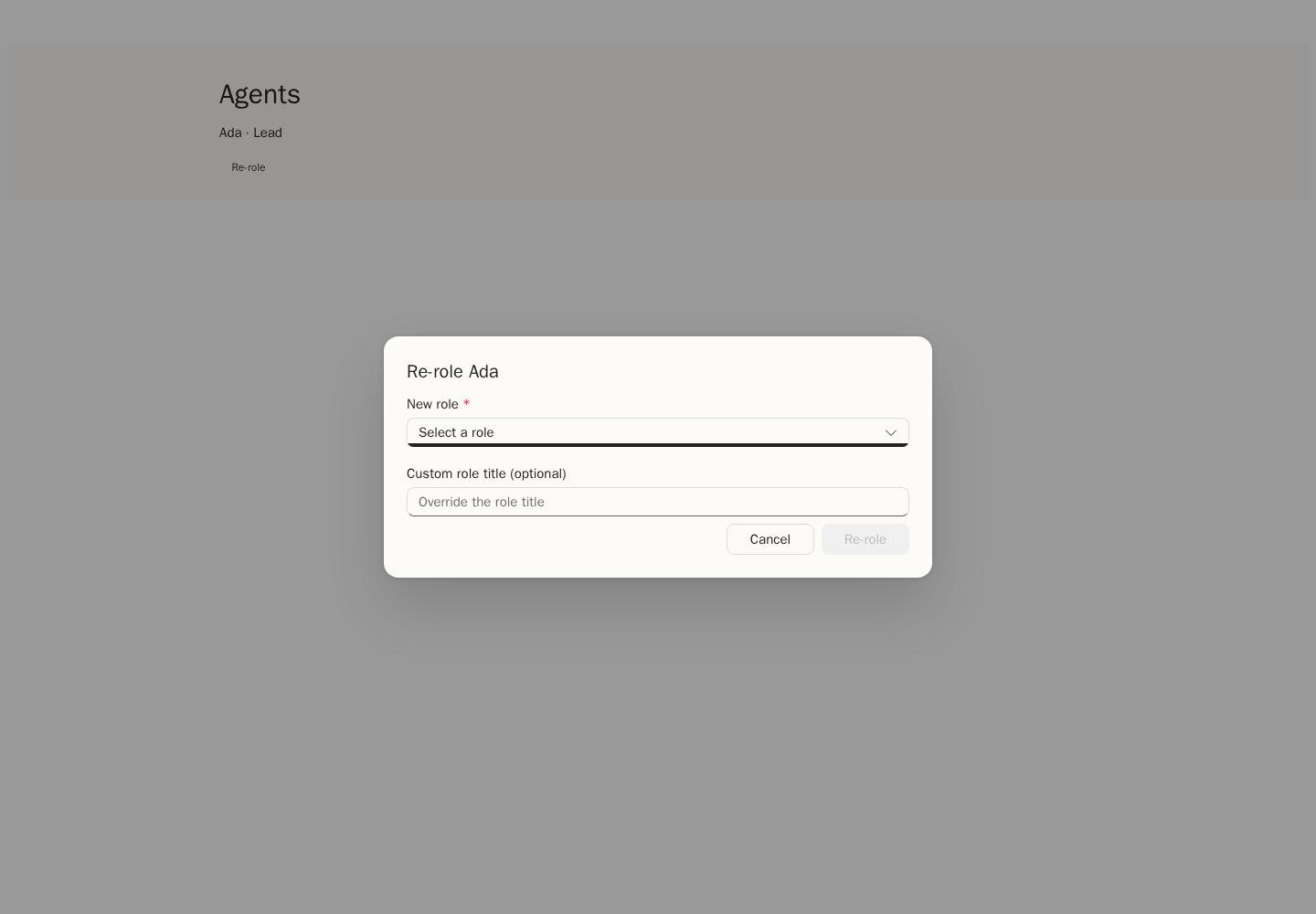
| Agents | Metrics row, filter, tiles, drawer with Overview, recent caller-visible history with loading, empty, permission, and error states, and Charter, proposal-based Remove from team and Re-role with optional custom role titles, Cast team, Add member, explicit repository preview and reviewed commit, digest-checked AgentSuite Sync export/import, and Pending team proposals. | Nothing. |
| Cast a team | Formulate, Template, and Analyze modes; goal, team size, role preferences, server-provided universe selection, and Augment or Recast when a team exists. AI output stays pending for review with role changes, custom titles, and member removal, then confirm or reject. | Nothing. |
| Skills | Stat strip, Add skill, Import skill with folder, files, or ZIP upload, Browse marketplaces with Suggested marketplaces, marketplace sources, browse, preview, import, Catalog with Remove skill, and Assignments. | Nothing. |
| Memories | Run and agent pickers, kind tabs, search, revisions, and transfer. Project-wide Knowledge uses GET /api/v1/projects/{projectId}/knowledge/records. | No missing backend route for Knowledge records; the 0.x project-wide count strip still needs page work. |
| Settings > General | Rename with the project revision. | Nothing. |
| Settings > Access | Your permissions and Members: list, Add member, and Remove. | Effective role names (behavior limit). |
| Settings > Repository, Platform components, Run limits, Connections, History, Advanced | Saved configuration fields and revisions. | Nothing. |
| Settings > Models | Default model, reasoning effort, credential, and per-task models. | Model catalog (behavior limit). |
| Settings > Danger zone | Archive and restore. | Project delete: DELETE /api/v1/projects/{projectId}. |
| Platform settings | All 16 platform component areas with owner, readiness, and implementations. | BYOK providers, platform-default Copilot status, account AI access. |
| Board | Backlog, Ready, Active, and Done columns with counts, summary strip, zoom, Intake, title and description edits, queue state, queue order, send all to Ready, archive, and prerequisite controls. | A task delete control, backlog settings, decompose, and the Human Review and Problems columns. |
| Flow | Project task notifications, Needs input including dismissed gates, Task stages, and Open, Working, and Done run groups. | The live agent graph for the project and current provider-side PR state per run. |
| Workflows | Saved workflow references: the default workflow and the workflow for each blueprint, from project configuration. | Workflow catalog, YAML, edit, run, generate, sync, default, and per-task override. |
| Workspace | Repository from configuration, Pull requests that runs opened or reused, and Issues synced into the backlog. | Branches: GET /api/v1/projects/{projectId}/source-control/refs; file tree: GET /api/v1/projects/{projectId}/source-control/tree?ref=; file content: GET /api/v1/projects/{projectId}/source-control/files/{path}?ref=. |
| Observability | Metric tiles, Activity chart, run totals, model and agent usage, and Recent runs. | Per-run traces and response-duration percentiles. |
| Diagnostics | Areas that are not ready from the platform component report, and Failed runs. | Service self-checks and project diagnostic reports. |
| Heartbeat | Seven-day metric tiles and Active and blocked runs. | Heartbeat records for each service process. |
| Cluster | Platform components with owner, readiness, and implementations. | Node and replica topology. |
| Apps and Canvas | Not shown. | Not planned for v1. |
Re-role comparison
In 0.x, Re-role changes a team member directly. In v1, it updates the member in a pending proposal; confirm the proposal to apply the change. A custom role title changes the display name without replacing the catalog role. These screenshots use example data.
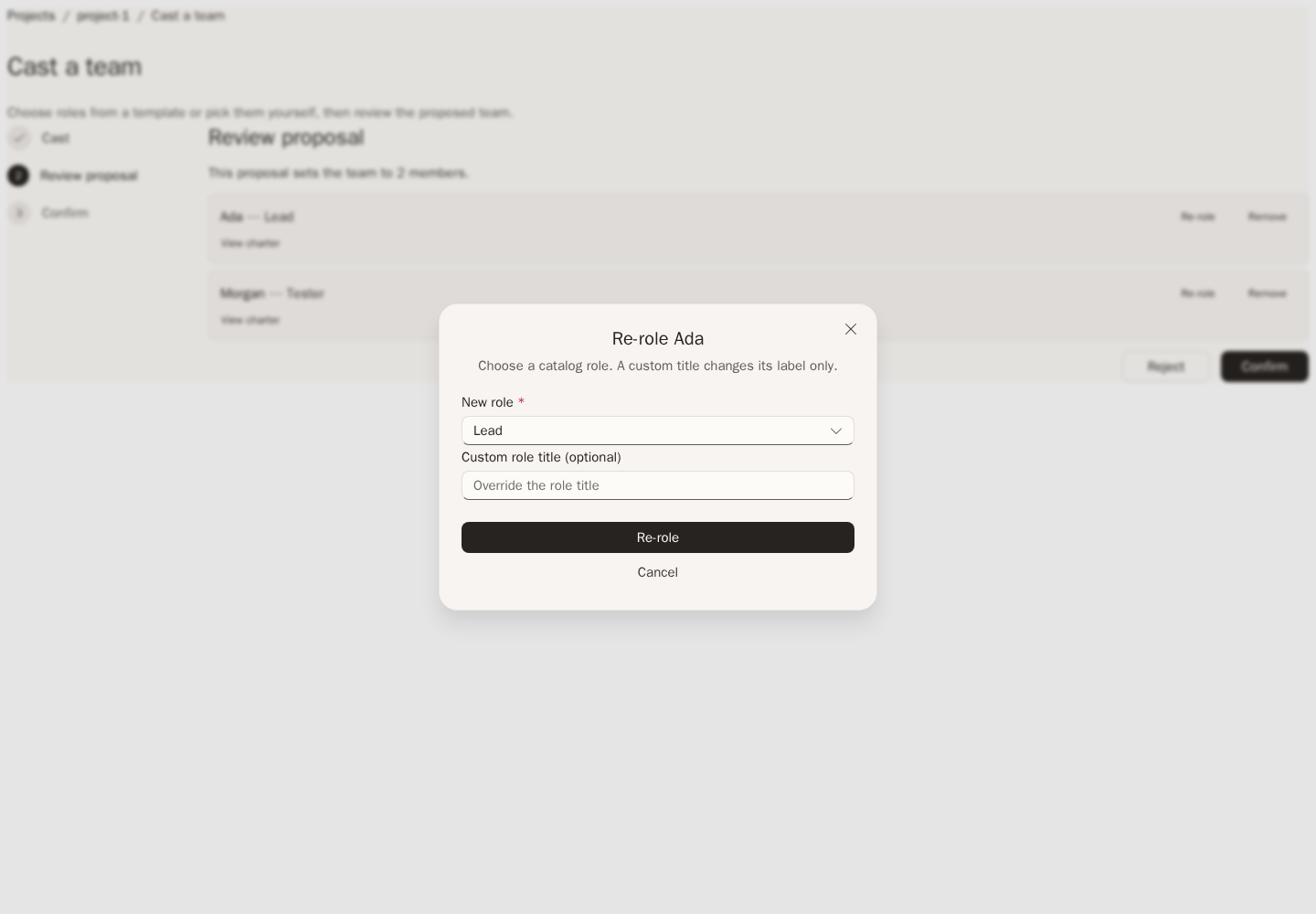
Every page shows a loading state, an empty state, a permission message for 403, and the service error for other failures. The Platform components section on Diagnostics and Cluster needs tenant or platform administrator access. Other users see a permission message there and the rest of the page.
Unavailable destinations
/observability/* without a project shows Not available in this version with a link back, because there is no summary across projects. Unknown addresses show Page not found. /console opens /assistant, and /projects/:projectId/sessions opens /sessions.
Endpoint gaps
Each row records a remaining endpoint or UI gap. A route marked available is in the Gateway catalog and uses the Orchestrator owner. The web client does not work around missing routes.
| Gap | 0.x endpoint | Missing v1 method and path | Plan |
|---|---|---|---|
| Board task position | POST /api/projects/{p}/backlog/reorder | Available: PUT /api/v1/projects/{projectId}/backlog/tasks/{taskId}/position | Queue positions are stored and revision-checked. Earlier and later actions target the neighboring visible task in the full state queue. |
| Send all to Ready | POST /api/projects/{p}/backlog/ready-all | Available: POST /api/v1/projects/{projectId}/backlog/ready-all | Moves eligible tasks in one graph change. The Board has a Backlog action. |
| Board columns and stages | GET /api/projects/{p}/board, GET /api/projects/{p}/workflow-stages | GET /api/v1/projects/{projectId}/board | Return Human Review and Problems placement with the backlog; show both columns. |
| Task delete | DELETE /api/projects/{p}/backlog/tasks/{id} | Available: DELETE /api/v1/projects/{projectId}/backlog/tasks/{taskId} | The route rejects tasks with dependents, accepted-plan origins, issue-sync receipts, or an active issue sync cycle. No matching 0.x card action was found, so the Board does not expose one. |
| Backlog settings | GET and PUT /api/projects/{p}/backlog/settings | GET and PUT /api/v1/projects/{projectId}/backlog/settings | Store intake and automation settings in the project owner. |
| Decompose | POST /api/projects/{p}/backlog/decompose | POST /api/v1/projects/{projectId}/backlog/decompose | Start a planning run that proposes subtasks; show them as a proposal. |
| Run delete | DELETE /api/runs/{id} | DELETE /api/v1/projects/{projectId}/runs/{runId} | Add delete for finished runs with an expected revision; add it to the run menu. |
| Run archive | POST /api/runs/{id}/archive | POST /api/v1/projects/{projectId}/runs/{runId}/archive | Hide finished runs from lists without deleting their records. |
| Run terminal diagnostic | GET /api/runs/{id}/terminal-diagnostic | GET /api/v1/projects/{projectId}/runs/{runId}/terminal-diagnostic | Return the failure reason of a failed run; show it in the status strip. |
| Run retry | POST /api/runs/{id}/retry | POST /api/v1/projects/{projectId}/runs/{runId}/retry | Create a new run from the same selection; link it from the failed run. |
| BYOK providers | GET and POST /api/admin/byok-providers, PUT and DELETE …/{id}, POST …/{id}/activate, POST …/deactivate | GET and POST /api/v1/platform/byok-providers, PUT and DELETE /api/v1/platform/byok-providers/{providerId}, POST …/{providerId}/activate, POST /api/v1/platform/byok-providers/deactivate | Store provider endpoints with secret references; add a Platform settings section. |
| Platform-default Copilot | GET /api/admin/platform-default-copilot/status, POST …/begin, POST …/disconnect | GET /api/v1/platform/copilot-connection, POST /api/v1/platform/copilot-connection/begin, POST /api/v1/platform/copilot-connection/disconnect | Platform runtime defaults hold model defaults only. Add a platform credential connection and show its status. |
| Account AI access | GET /api/account/ai-access | GET /api/v1/account/ai-access | Return which model sources the caller can use; show it in the persona menu. |
| Operator assistant | POST /api/assistant/runs, POST /api/assistant/runs/{id}/messages, GET /api/assistant/runs?limit= | POST /api/v1/assistant/runs, POST /api/v1/assistant/runs/{runId}/messages, GET /api/v1/assistant/runs | Chief of Staff conversations exist but cannot start a run without a project. Add project-less runs, then let New session skip the project picker. |
| Unattended GitHub readiness | GET /api/projects/{p}/github/unattended-readiness | GET /api/v1/projects/{projectId}/source-control/unattended-readiness | Report whether runs can use the repository without a signed-in user; show it on Settings > Repository. |
| Automation status | GET /api/projects/{p}/automation/status, POST …/activate, POST …/deactivate | GET /api/v1/projects/{projectId}/automation, POST /api/v1/projects/{projectId}/automation/activate, POST /api/v1/projects/{projectId}/automation/deactivate | Report and switch backlog automation; add a Board control. |
| Response-duration percentiles | GET /api/projects/{p}/metrics fields responseDuration and timeToFirstToken (p50Ms, p95Ms) | Same fields on GET /api/v1/projects/{projectId}/metrics | Add p50 and p95 to the metrics response; show two tiles on Observability. |
| Cross-project overview | GET /api/overview | GET /api/v1/overview | Return totals across the caller's projects; show them on Overview and on /observability. |
| Live project health | GET /api/projects/{p}/dashboard | GET /api/v1/projects/{projectId}/health | Define an owner read for the project's current run health, publish it through the Gateway, then show it in the dashboard status card. Until then, show saved setup readiness instead. |
| Overview activity feed | GET /api/overview field recent_activity | GET /api/v1/overview field recentActivity | Collect run, merge, and deployment events from the relevant owners, then provide a caller-scoped event list. Until then, show recent run states only. |
| Dashboard task completions | GET /api/projects/{p}/dashboard field tasks_done_this_week | GET /api/v1/projects/{projectId}/task-metrics | Record task completion timestamps in the backlog owner and return measured counts by range. Until then, keep the completed tasks tile unavailable. |
| Dashboard agent leaderboard | GET /api/projects/{p}/metrics field leaderboard | GET /api/v1/projects/{projectId}/agent-metrics | Add per-agent run outcomes and duration data to the run owner, with its agent identity, before publishing ranked agent results. Until then, show an unavailable leaderboard, not project-wide success as an agent score. |
| Daily success trend | GET /api/projects/{p}/metrics daily quality trend | GET /api/v1/projects/{projectId}/metrics field dailySuccess | Aggregate the run owner's terminal outcomes by day and return the numerator and denominator per bucket. Until then, show the selected-range success rate without a daily trend. |
| Run traces | GET /api/metrics/runs/{runId}/traces | GET /api/v1/projects/{projectId}/runs/{runId}/traces | Run Activity replays run events today. Add span timing and show a trace view. |
| Diagnostics | GET /api/diagnostics, GET /api/diagnostics/detailed | GET /api/v1/platform/diagnostics | Return service self-checks; add a section on Diagnostics. |
| Project diagnostics | GET /api/projects/{p}/diagnostics | GET /api/v1/projects/{projectId}/diagnostics | Return configuration and connection checks for one project. |
| Heartbeat | GET /api/diagnostics/heartbeat | GET /api/v1/platform/heartbeat | Return the last heartbeat of each service process; add a table on Heartbeat. |
| Cluster topology | GET /api/diagnostics/cluster, GET /api/diagnostics/cluster/topology | GET /api/v1/platform/cluster | Return nodes and replicas; add a table on Cluster. |
| System runtime | GET /api/system/runtime | GET /api/v1/platform/runtime | Return version and host details; show them on Cluster. |
| Workflow catalog | GET /api/projects/{p}/workflows, GET …/workflows/{id}, GET …/workflows/{id}/yaml | GET /api/v1/projects/{projectId}/workflows, GET /api/v1/projects/{projectId}/workflows/{workflowId} | Return available workflows and their definitions; list them on Workflows. |
| Workflow edit | PUT /api/projects/{p}/workflows/{id}, POST …/workflows/generate | PUT /api/v1/projects/{projectId}/workflows/{workflowId}, POST /api/v1/projects/{projectId}/workflows/generate | Save workflow definitions with a revision. |
| Workflow sync | POST /api/projects/{p}/workflows/sync | POST /api/v1/projects/{projectId}/workflows/sync | Read workflow files from the repository. |
| Workflow run | POST /api/projects/{p}/workflows/{id}/run | POST /api/v1/projects/{projectId}/workflows/{workflowId}/runs | Start a run with that workflow. |
| Default workflow | PUT /api/projects/{p}/workflows/default | None needed: PUT /api/v1/projects/{projectId}/configuration saves defaultWorkflowId | Add an edit control once the catalog lists choices. |
| Task workflow override | PUT /api/projects/{p}/backlog/tasks/{id}/workflow-override | PUT /api/v1/projects/{projectId}/backlog/tasks/{taskId}/workflow | Store a workflow choice on a task; add it to the card editor. |
| Workspace refs | GET /api/projects/{p}/workspace/refs | GET /api/v1/projects/{projectId}/source-control/refs | Return branches and tags; add a branch picker on Workspace. |
| Workspace tree | GET /api/projects/{p}/workspace?ref= | GET /api/v1/projects/{projectId}/source-control/tree?ref= | Return the file tree at a ref. |
| Workspace file content | GET /api/projects/{p}/workspace/files/{path}/content | GET /api/v1/projects/{projectId}/source-control/files/{path}?ref= | Return one file; show it in a viewer. |
| Project memory | GET /api/projects/{p}/memory, GET /api/projects/{p}/agents/{a}/memory | GET /api/v1/projects/{projectId}/knowledge/records | Project-wide Knowledge search and revision history are available across existing provider bindings. Project runs link directly to their session tree and Activity journal; a consolidated project history is not available. |
| Agent history | GET /api/projects/{p}/team/members/{name}/history | GET /api/v1/projects/{projectId}/agents/{agentId}/history | Return recent history for one project agent; show it in the Agents drawer. |
| Repository-backed team sync | GET and POST /api/projects/{p}/team/sync | GET and POST /api/v1/projects/{projectId}/team/sync | The Agents Sync panel loads a preview when opened, displays the hash and changed .squad/ paths, and requires explicit commit with an optional message. The hash binds project revision, GitHub installation and repository IDs, branch head, and files. No files are mirrored automatically. Digest-checked AgentSuite export/import remains a separate portable transfer. |
| Project delete | DELETE /api/projects/{p}?confirm=true | DELETE /api/v1/projects/{projectId} | Delete an archived project with its revision; add it to Danger zone. |
Behavior limits
These limits are not missing routes:
- Owner grant on create: creating a project does not grant the creator access, so create-from-GitHub can't always save the repository.
- Effective role names: the authorization context lists permissions, not role names. Tiles show access based on permissions.
- Project health: there is no live status dot. The dashboard shows readiness from saved configuration.
- Model catalog: the Gateway does not return the available models and providers. Enter existing model and credential references.
Evidence boundary
Personal Priorities and the private conversation list are new Gateway adapters, not copies of a 0.x page. The new chat and follow-up forms use the retained NewChatComposer; Flow groups use RunList, and gates use DecisionView and AttentionList. Existing project pages remain available alongside these views.
Priority issue and pull request choices use authorized stored owner lists. Saved-capture list, detail and Priority selection are also new Gateway adapters. Their file tree and Source/Preview content reuse FilesTabPanel and FileViewer. Compare those components at matching widths, but do not invent a 0.x screenshot for the new adapters. See Chief of Staff for behavior and limits.
Local screenshots use fixture data and isolated source snapshots. They compare 0.x, v1 before the adaptation, and adapted v1 without live sign-in or real credentials. They do not prove deployed identity, authorization, or live providers. For the actual routes, settings, and current limits, see Use the v1 web client.