Agent Runtime & Tools — Conceptual Deep Dive
Purpose and scope
The runtime turns a human request into an agent turn, makes tools available safely, selects providers, and records what happened. The goal is to explain the logic well enough for an engineer to rebuild the runtime from first principles, not to trace source files line by line.
Primary scope:
Agentweaver.AgentRuntime: the turn loop, provider seams, workflow agents, governance, RAI/Scribe touchpoints, and event emission.Agentweaver.AgentTools: the model-callable tool catalog and the per-run context that makes tools safe and reproducible.
Agentweaver.Squad is only a runtime input here. For casting, roster management, .squad/ serialization, naming, and memory import/export, see Team Casting — Deep Dive.
The runtime mental model
An Agentweaver run is not simply "send a prompt to a model." It is a controlled workflow around a model turn:
- Prepare an isolated workspace so the agent can change files without directly mutating the source branch.
- Assemble identity and context from the selected agent charter, task, project memory, active decisions, session context, and workspace boundaries.
- Create a provider-backed turn agent that knows how to speak to a model provider and stream results.
- Expose tools through a governed tool plane so the model can inspect, edit, ask questions, report intent, and record memory without bypassing policy.
- Stream normalized events so the UI, persistence layer, watch loop, review gates, and coordinator can reason about the run without knowing provider internals.
- Persist the work and observations by committing workspace changes, computing a diff, running review/RAI/Scribe steps, and exporting memory when appropriate.
The important design choice is that model execution is treated as one node inside a broader workflow. The model decides what to do next, but the runtime decides what context it receives, which tools exist, whether an action is allowed, how output is observed, and how the run advances.
Package responsibilities
| Area | Conceptual responsibility |
|---|---|
Agentweaver.AgentRuntime | Owns the live turn agents, provider adapters, workflow executors, sandbox governance, run-event emission, review/RAI/Scribe integration, and Agentweaver loopback API tools. |
Agentweaver.AgentTools | Defines the canonical tool contracts as AIFunctions and the per-run context they need: workspace, sandbox root, executor, redactor, approvals, options, event hooks, and question gates. |
Agentweaver.Squad | Supplies runtime inputs such as agent identity, charters, team membership, decisions, and memory artifacts. The runtime consumes these inputs but does not own team casting. |
The packages are intentionally separated so tool contracts can remain provider-neutral while the runtime decides how each provider sees and governs those tools.
Where this lives:
packages/Agentweaver.AgentRuntimepackages/Agentweaver.AgentToolspackages/Agentweaver.Squad
The life of a run
A run begins in the API layer, but its core shape is runtime-driven:
- Reserve the run. The API validates the task, repository/project, branch, model preference, and optional
agent_name. It creates a durable run record before work begins. - Resolve the working area. The orchestrator creates or reuses a worktree. Coordinator child runs can share a parent worktree so subtasks collaborate on one branch instead of creating isolated branches that later conflict.
- Resolve the agent identity. Project runs validate that the requested agent exists in the team and load that agent's charter. The charter is part of the system context, not an implementation detail.
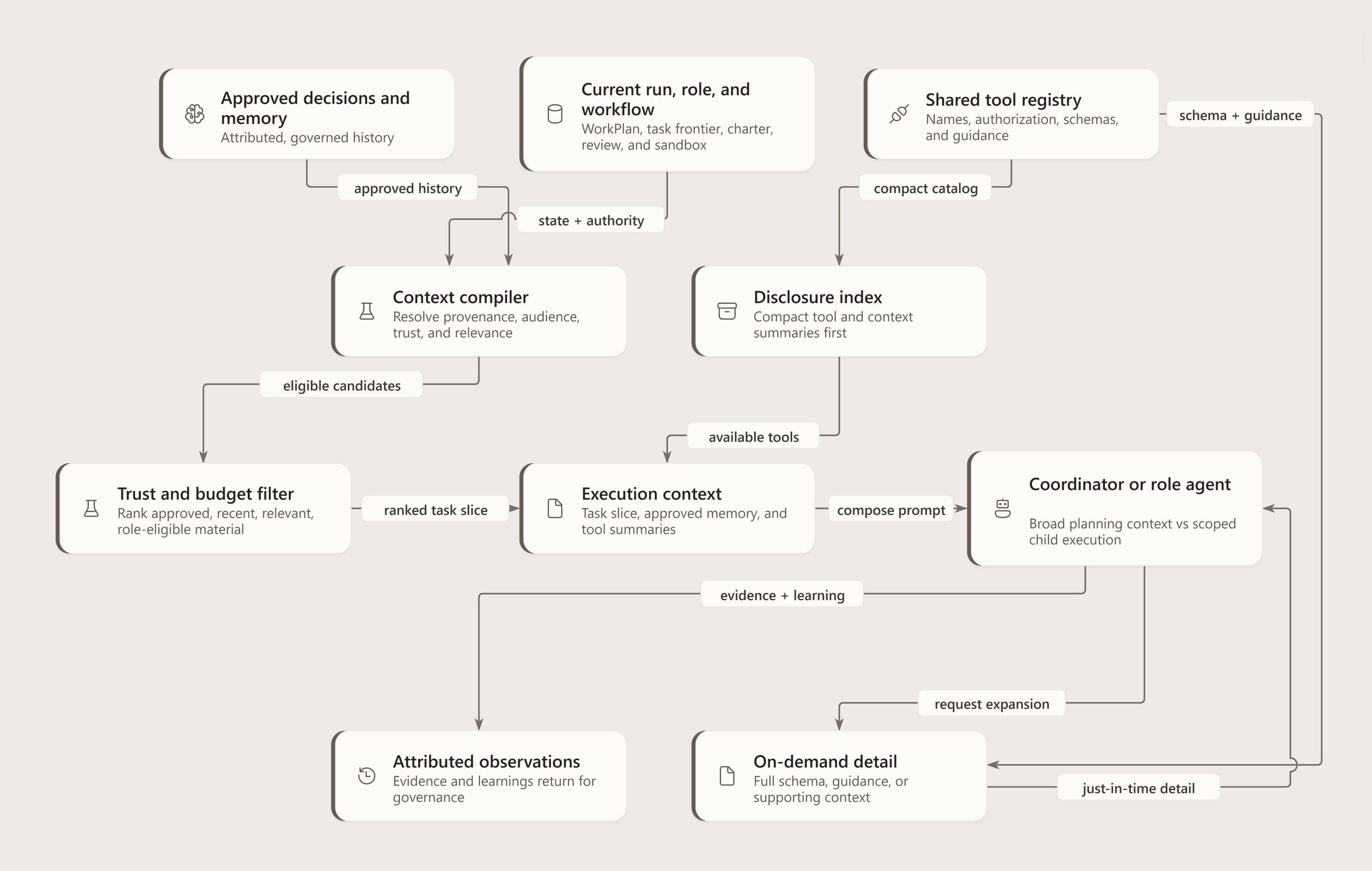
- Compile context. Runtime context is ordered so durable decisions and memory precede the current task. Child worker runs receive narrower context to reduce leakage and keep subtasks focused.
- Start a workflow. The workflow wraps the worker turn with surrounding nodes: review, merge, RAI, Scribe, and coordinator-specific paths when needed.
- Watch and persist. A watch loop listens to workflow and runtime events, translates them into UI-visible status, persists history, and handles terminal states.
For a remote LocalWritable turn, completion includes a prepared-writeback envelope. The worker validates and applies that envelope before ordinary commit/diff bookkeeping. A missing or invalid required envelope fails the turn; it is not a successful no-change result.
Why this shape?
- The run must be restartable. Workflows and provider sessions can be checkpointed or reconstructed, so long-running runs survive process boundaries better than a single in-memory method call.
- The model must not own policy. The model can request a shell command or file edit, but governance, approvals, and sandbox boundaries are enforced outside the model.
- The UI needs provider-neutral events. A Copilot stream, a tool denial, and a review gate all become normalized run events.
- Post-processing is part of correctness. A useful agent run is not complete when the model stops talking; Agentweaver still needs a diff, commit, review state, RAI verdict, and memory pass.
Where this lives:
apps/Agentweaver.Api/Runspackages/Agentweaver.AgentRuntime/Workflowpackages/Agentweaver.AgentRuntime/CopilotAIAgent.cs
Agent turn loop
A turn is one bounded attempt by an agent to satisfy a task in a workspace. The turn loop has five conceptual phases.
1. Setup: build the run-scoped execution environment
The turn agent is configured per run, not globally. Setup receives the working directory, repository root, run id, model id, stream writer, project id, agent name, system context, and cancellation token. From those inputs it builds:
- a provider session configuration;
- a deterministic session identity tied to the run;
- a system prompt containing the base runtime instructions plus charter/memory context;
- sandbox policy and the selected command executor;
- file/search/edit helper objects scoped to the workspace;
- tool context and tool catalog;
- a permission handler that mediates native provider operations;
- an event emitter that can write normalized
RunEvents.
This phase intentionally disables provider-side config discovery for the live Copilot path. The runtime wants a controlled tool surface; it should not accidentally load arbitrary local MCP servers, skills, or config from the repository.
Invariant: anything that can affect tool access, workspace location, prompt context, or event output must be derived during setup and reset between runs. A reused agent instance must not leak event state, permission state, or registered tool names from a previous run.
2. Start or resume the provider session
The live Copilot worker uses a provider SDK session. If a workflow resumes, the runtime can deserialize the provider session state; otherwise it creates a fresh session. This is why the live worker implements serialization hooks. Ephemeral built-in reviewers such as RAI and Scribe intentionally do not need durable session state because they run short, single-purpose turns.
Trade-off: preserving provider session state improves continuity and checkpointing, but it couples the live worker to provider-specific serialization. Agentweaver hides that coupling behind the workflow turn-agent interface.
These local provider hooks do not establish restoration of the same provider session in a replacement AgentHost pod. IWorkflowTurnAgent exposes setup, turn execution and disposal; the remote proxy creates its own A2A session.
3. Stream model execution
The runtime sends the task into the provider session and consumes streaming updates. During streaming it emits:
- configuration snapshots such as selected sandbox backend and registered tools;
- the task and effective system prompt metadata;
- assistant token deltas;
- tool call, result, and error events;
- special semantic events such as
agent.intentandrun.outcome; - terminal turn events.
The runtime also retries known recoverable provider failures such as token refresh or rate-limit cases. It does not change the task semantics during retry; it simply attempts to complete the same turn.
Invariant: every observable action should produce stable, ordered events. Tool results must not appear before their call. Denials must not be silent. A degraded run must emit run.degraded before the run appears terminal to clients.
4. Mediate tool use
The model may request file reads, edits, shell commands, URL fetches, API tools, or custom functions. The runtime classifies the request, evaluates policy, and either allows execution or returns a denial.
For Copilot live runs, native provider operations are governed through the permission-request callback. This lets Agentweaver use provider-native file/shell capabilities while still applying Agentweaver policy. For registered custom functions, the runtime can decide whether to suppress raw tool lifecycle events and emit more meaningful domain events instead.
Invariant: the model only sees string-like tool results. This keeps the tool contract simple and portable across providers.
5. Close the turn and hand control back to the workflow
When the provider has no more work for the turn, the executor collects the assistant response, commits workspace changes, computes the diff, counts steps, and returns a structured turn output. The workflow then decides whether to proceed to review, ask for revision, merge, run RAI, run Scribe, or finish.
Trade-off: committing at the turn boundary creates a clear audit point and diff, but means each turn must be treated as an atomic unit of work. Multi-turn revision is modeled as additional workflow edges rather than hidden continuation inside the provider loop.
Where this lives:
packages/Agentweaver.AgentRuntime/CopilotAIAgent.cspackages/Agentweaver.AgentRuntime/Workflow/AgentTurnExecutor.cspackages/Agentweaver.AgentRuntime/Workflow/IWorkflowTurnAgent.cs
Runner and workflow seams
GitHubCopilotAgentRunner is the sole IAgentRunner implementation for one-shot, model-assisted tasks such as casting. Project and coordinator runs use the Microsoft Agents Framework workflow path: RunWorkflowFactory → AgentTurnExecutor → CopilotAIAgent. Both paths use the GitHub Copilot SDK, so provider behavior and tool governance are not reimplemented in a separate runner.
Where this lives:
packages/Agentweaver.Domain/IAgentRunner.cspackages/Agentweaver.Domain/ModelSource.cspackages/Agentweaver.AgentRuntime/GitHubCopilotAgentRunner.cspackages/Agentweaver.AgentRuntime/Workflow
Tool model
Tools are the runtime's contract with the model. A tool is not just a method; it is a named capability with a schema, description, result contract, policy context, and event behavior.
Why tool context is per-run
The same tool name can mean different concrete authority in different runs. read_file in one run must be scoped to that run's worktree, while run_command may be disabled, sandboxed, or approval-gated depending on run options. For that reason, tools are built from a SandboxToolContext rather than from global singletons.
A run-scoped tool context contains the facts a tool needs to make safe decisions:
- agent identity and run id;
- working directory and sandbox root;
- command executor and whether it provides real isolation;
- file/search/edit helpers restricted to allowed roots;
- output redaction;
- shell/network/destructive-command options;
- approval predicates and question gates;
- event hooks for user-visible progress.
Invariant: tools should not rediscover authority from process state. They should receive authority explicitly through context.
Canonical sandbox tools
The canonical catalog covers a small set of capabilities:
| Capability | Conceptual purpose |
|---|---|
read_file | Let the model inspect known files. |
file_search | Let the model discover paths by glob-like patterns. |
grep_search | Let the model find text without reading the whole repository. |
str_replace_editor | Make precise edits when the old text is known. |
apply_patch | Apply structured multi-file patches. |
create_file / write_file | Create or overwrite files when the runtime allows it. |
run_command | Execute commands through the selected sandbox/direct executor, subject to shell policy and approval. |
report_intent | Let the agent announce what it is about to do in a UI-friendly way. |
report_outcome | Let the agent declare whether the task was achieved and why. |
ask_question | Let the agent request human input through a controlled gate instead of stalling silently. |
run_command is conditional. It only exists when shell execution is enabled and the selected executor mode is acceptable for the run. This avoids advertising a capability the runtime will never allow.
Copilot live tool exposure
The live Copilot path intentionally does not register the entire sandbox catalog as custom functions. Instead:
- provider-native file operations (
view/read, write,str_replace_editor,grep,glob) are allowed to exist, but every operation is mediated by the permission handler, which enforces working-directory containment; - provider-native shell is not allowed. The SDK's native shell executes in-process and never routes through
ISandboxExecutor/bubblewrap — the permission handler can only see the working directory, not the command text or per-command filesystem confinement. The handler therefore rejects every native shell request for every run (not just Assembly Build/Test), and shell is exposed solely through the sandboxedrun_commandcustom function, which runs the command through the selected sandbox/direct executor andShellCommandValidator; - selected custom functions such as intent/outcome/question are registered because they represent Agentweaver-specific semantics;
- Agentweaver API tools are registered when the run has project and agent identity;
- raw lifecycle events for some semantic tools are suppressed and replaced with higher-level events such as
agent.intentorrun.outcome.
run_command is conditional: it is registered only when the executor provides real isolation (or direct mode) and shell policy is enabled. When shell is disabled there is no shell path at all — native shell is denied and run_command is absent — which is the intended fail-closed behavior.
This design avoids duplicate/conflicting file tools while keeping Agentweaver governance in front of native provider operations and ensuring all shell execution passes through the sandbox executor.
Agentweaver API tools
Agentweaver API tools are runtime-owned loopback tools, not sandbox file tools. They let agents interact with project state through the same API surface humans and MCP clients use.
Common project-agent tools include:
- submit a decision to the inbox;
- record memory;
- update the current session;
- list decisions and pending inbox entries;
- read memory;
- export memory artifacts.
Coordinator runs receive additional coordination tools because they manage plans and child work. Regular workers should not get coordinator-only authority.
Trade-off: loopback API tools make agents first-class participants in project memory, but they must be scoped by project id, agent name, API base URL, and API key. Without those boundaries, a tool call could affect the wrong project.
The callback also carries run identity and a run capability token, validated by API authorship/scope checks. Runtime permission approval does not itself authorize a cross-project or cross-run API operation.
The final system prompt is composed only after the session's callable tools are registered. Its single project-memory section is omitted when none are registered and names only tools in that specific session; detailed invocation guidance remains in the tool declarations.
Human-in-the-loop tools
Some actions require a human or external decision:
- shell commands may require approval globally or when they match destructive patterns;
- URL fetches can be approval-gated;
ask_questioncan pause on a question gate and resume with the answer.
API-hosted runs persist shell approvals/denials, tool-approval context, approval/denial decisions, run-scoped and always-allowed policies, parent-child approval inheritance, pending questions/answers, and run options such as auto-approve and autopilot as ordered run events. The API registers durable IShellApprovalStore, IToolApprovalGate, IQuestionGate, and IRunOptionsStore implementations after the runtime defaults, so a worker on one replica can wait while an operator click, answer, or toggle lands on another replica.
The tool should always produce a useful result even when the gate is unavailable or times out: either a denial, a fallback instruction to use best judgment, or an explicit explanation. Silent blocking is not acceptable.
Where this lives:
packages/Agentweaver.AgentToolspackages/Agentweaver.AgentRuntime/AgentweaverApiTools.cspackages/Agentweaver.AgentRuntime/SandboxGovernance.csapps/Agentweaver.Api/Runs/DurableToolApprovalGate.csapps/Agentweaver.Api/Runs/DurableQuestionGate.csapps/Agentweaver.Api/Runs/DurableShellApprovalStore.csapps/Agentweaver.Api/Runs/DurableRunOptionsStore.csapps/Agentweaver.Api/Runs/DurableRunControlState.cspackages/Agentweaver.AgentRuntime/InMemoryQuestionGate.cs
Governance and sandboxing
The runtime assumes model output is untrusted intent. A requested command or edit is not safe just because the model produced it.
Governance answers three questions:
- Is the capability available? For example, shell execution may be disabled entirely.
- Is the target in bounds? File operations should stay inside allowed repository/workspace roots.
- Does the action need approval or denial? Destructive commands, broad shell access, URL fetches, and native tool requests can require explicit approval or fail closed.
The sandbox executor is the mechanical side of this policy. It determines where commands run and whether execution has real isolation. The governance layer is the decision side. The event stream is the observability side.
Important invariant: denial is a successful policy outcome, not an internal failure. The agent and UI should see that the attempted action was blocked, why it was blocked, and whether the run is now degraded.
Trade-off: stricter fail-closed behavior improves safety but can reduce agent autonomy. Agentweaver mitigates this by surfacing denials as context the agent can adapt to, rather than hiding them.
Where this lives:
packages/Agentweaver.AgentRuntime/SandboxGovernance.cspackages/Agentweaver.SandboxExecpackages/Agentweaver.AgentTools/Tools/RunCommandTool.cs
Event emission
Events are the runtime's shared language. They decouple provider-specific streaming from the rest of Agentweaver.
The durable stream and cross-replica replay sequence owns persistence and cursor delivery; the runtime emits into that pipeline rather than moving database ownership into AgentHost.
A useful event stream must provide:
- ordering: sequence numbers increase monotonically for a run;
- correlation: tool results and errors refer back to tool calls;
- semantic compression: noisy provider internals can become domain events like
agent.intent; - durability: live streams can be mirrored into persistent history;
- terminal clarity: clients should know when a turn ended, when a run degraded, and when workflow nodes completed.
The Copilot live agent therefore emits both low-level and high-level events: token deltas, tool calls, tool results, tool errors, sandbox selections, warnings, system prompt metadata, task metadata, RAI verdicts, Scribe status, and run outcome signals.
The runtime is careful about event timing. If a tool denial happens near the end of a turn, run.degraded is flushed before the terminal turn/run events so a live client does not render a clean success while missing the warning.
Where this lives:
packages/Agentweaver.AgentRuntime/CopilotAIAgent.cspackages/Agentweaver.AgentRuntime/EphemeralCopilotAIAgent.cspackages/Agentweaver.AgentRuntime/Workflow/WorkflowStepEvents.csapps/Agentweaver.Api/Runs/RunWatchLoopService.csapps/Agentweaver.Api/Runs/RunWorkflowFactory.cs
RAI and Scribe touchpoints
RAI and Scribe are built-in agents that reuse the same Copilot-based turn machinery but serve narrow workflow roles. Runtime construction uses one parameterized ephemeral agent implementation so both roles stay non-restorable while retaining distinct role names and prompts at their executors.
RAI
RAI runs after the worker produces changes and before the work is treated as safe to ship. It receives the produced diff and reviews for security vulnerabilities, harmful content, PII exposure, and ethical concerns. Its verdict controls workflow behavior:
- GREEN: proceed.
- YELLOW: advisory warning; proceed with caution.
- REVISE: send actionable feedback back into the workflow so the worker can revise.
- RED: flag content safety and fail the RAI gate.
The verdict parser is intentionally defensive: it looks for explicit verdict markers rather than treating any mention of a word like "red" as a verdict. If RAI fails or returns an unparseable response, configuration decides whether to fail closed or proceed with an advisory warning.
Scribe
Scribe runs after a project run reaches a terminal state. Its role is memory hygiene, not code generation. It reviews what happened, records durable learnings or patterns, updates session context, and exports memory artifacts. Scribe failures are non-fatal to the completed run; they should be visible, but they should not turn a finished worker run into a failed one.
Scribe uses the same loopback API tool model as other agents, but its charter narrows authority: manage memory, merge/archive/export as appropriate, and do not make product/design decisions on behalf of the worker.
Where this lives:
packages/Agentweaver.AgentRuntime/EphemeralCopilotAIAgent.cspackages/Agentweaver.AgentRuntime/Workflow/RaiTurnExecutor.cspackages/Agentweaver.AgentRuntime/Workflow/ScribeTurnExecutor.cs
Squad touchpoints
The runtime consumes Squad data as context and routing input:
- project run submission validates that
agent_namebelongs to the active team; - the selected agent's charter is injected into the system context;
- project decisions and memories are compiled into prompt context;
- coordinator planning can assign work to real team members and dispatch child runs through the same runtime path.
The runtime should not know how to cast a team, name agents, or serialize the .squad/ directory beyond consuming the artifacts it needs. Keep that domain in Squad. See Team Casting — Deep Dive.
Where this lives:
apps/Agentweaver.Api/Endpoints/ProjectEndpoints.csapps/Agentweaver.Api/Runs/RunOrchestrator.csapps/Agentweaver.Api/Coordinatorpackages/Agentweaver.Squad
Rebuilding the runtime: design checklist
If you were rebuilding Agentweaver's runtime, preserve these design invariants:
- Separate workflow orchestration from provider execution. A model turn is a workflow node, not the whole run.
- Make provider selection explicit. Do not assume a model source string affects live workflows unless the workflow factory dispatches on it.
- Build tools per run. Tool authority must come from run context, not process globals.
- Govern before executing. File, shell, network, native, and API actions must pass policy outside the model.
- Return stable tool strings. Providers differ, but the model should receive simple, predictable tool results.
- Normalize events. UI and persistence should depend on Agentweaver event types, not provider SDK objects.
- Make denials observable. A blocked action should emit a tool error and, when appropriate, a degraded-run signal.
- Commit at boundaries. The workflow needs durable worktree state and diffs after turns.
- Keep memory explicit. Agents record decisions and memory through API tools; prompt context is compiled deliberately.
- Treat reviewers as agents with narrow charters. RAI and Scribe reuse the runtime but have constrained responsibilities.
Extension points and gotchas
Adding a tool
To add a provider-neutral sandbox tool:
- Define the tool name, input schema, description, and string result contract.
- Decide what run-scoped authority it needs and add that to the tool context if necessary.
- Add it to the canonical registry only if it should be generally available.
- Decide whether Copilot should use a native provider capability plus permission handling, or a selected custom function for Agentweaver-specific semantics.
- Add governance and event behavior before exposing it to the model.
Gotchas:
- Advertising a tool the runtime will deny every time trains the model badly. Prefer conditional registration.
- If the tool has side effects, denial and approval paths need first-class event output.
- Avoid returning complex provider-specific objects. Convert results into concise strings.
Adding a provider
Add providers through the GitHub Copilot SDK's provider configuration, preserving the existing system-prompt context, memory instructions, event semantics, and tool governance. Do not add a separate provider-specific runner.
Changing RAI or Scribe
RAI and Scribe are workflow safety/memory nodes, not general worker agents. Keep their charters narrow and their failure behavior explicit:
- RAI may block or request revision depending on verdict.
- Scribe should report failure but not invalidate an already-terminal worker run.
- Both should avoid long-lived session assumptions unless their workflow role changes.
Diagram details and constraints
| Element | Contract |
|---|---|
| title | Tool permission is not API authorization |
| takeaway | Native shell is denied; controlled commands, URL approval and API scope are separate gates. |
| Capability request | Capability request |
| Capability request | Model intent, not permission |
| Capability request | Classify native / custom / API |
| Native shell | Native shell |
| Native shell | Always rejected |
| Native shell | No approval bypass |
| Denied result | Denied result |
| Denied result | Explicit error to caller |
| Denied result | tool.error / HTTP rejection |
| Controlled command | Controlled command |
| Controlled command | ShellEnabled + real or direct |
| Controlled command | Policy + directory + approval |
| Selected executor | Selected executor |
| Selected executor | Only permitted commands |
| Selected executor | Return redacted command result |
| URL permission | URL permission |
| URL permission | Existing policy or human wait |
| URL permission | Grant / deny / expiry |
| API tool | API tool |
| API tool | Runtime permission first |
| API tool | Authenticated HTTP callback |
| API authorization | API authorization |
| API authorization | Run + project + agent scope |
| API authorization | Allow operation or reject |
| Operation result | Operation result |
| Operation result | Return to requesting agent |
| Operation result | No universal approval gate |
| arrow-1 | shell |
| arrow-2 | reject |
| arrow-3 | allow |
| arrow-4 | check |
| arrow-5 | return |
| note-0 | Native file requests have their own permission/governance checks. |
| note-1 | Shell approval can return a retry instruction; URL approval may wait. |
| note-2 | The three rows are separate capability paths, not sequential execution. |
| notes | Native file requests have their own permission/governance checks.; Shell approval can return a retry instruction; URL approval may wait.; The three rows are separate capability paths, not sequential execution. |
Diagram details and constraints
| Element | Contract |
|---|---|
| title | A completed turn still needs a durable result |
| takeaway | Remote writable results are validated and applied before ordinary worker commit bookkeeping. |
| Reserve run | Reserve run |
| Reserve run | Validate identity and task |
| Reserve run | Durable admission |
| Prepare context | Prepare context |
| Prepare context | Workspace + charter + skills |
| Prepare context | Children: decisions-only memory |
| Workflow | Workflow |
| Workflow | Graph remains in host |
| Workflow | Local agent or remote leaf |
| Execute leaf | Execute leaf |
| Execute leaf | Provider and controlled tools |
| Execute leaf | Logical, not one physical host |
| Prepared writeback | Prepared writeback |
| Prepared writeback | Required for LocalWritable |
| Prepared writeback | Missing/invalid means failure |
| Validate and apply | Validate and apply |
| Validate and apply | Run / base / tree / branch |
| Validate and apply | Fast-forward authoritative tree |
| Local/shared result | Local/shared result |
| Local/shared result | No remote envelope required |
| Local/shared result | Worker-side post-processing |
| Commit and diff | Commit and diff |
| Commit and diff | After validated application |
| Commit and diff | Ordinary bookkeeping remains |
| Watch and persist | Watch and persist |
| Watch and persist | Normalize terminal outcome |
| Watch and persist | Durable events and status |
| arrow-1 | prepare |
| arrow-2 | start |
| arrow-3 | invoke |
| arrow-4 | remote |
| arrow-5 | verify |
| arrow-6 | local |
| arrow-7 | record |
| arrow-8 | apply |
| arrow-9 | persist |
| note-0 | Rows separate admission, remote writeback and final bookkeeping. |
| note-1 | Local provider serialization does not prove replacement-pod session restoration. |
| notes | Rows separate admission, remote writeback and final bookkeeping.; Local provider serialization does not prove replacement-pod session restoration. |
Diagram details and constraints
| Element | Contract |
|---|---|
| title | Durable allocation, then cursor replay |
| takeaway | Cross-replica delivery polls shared rows; local notifications are not a distributed bus. |
| RecordNext | RecordNext |
| RecordNext | Request sequence allocation |
| RecordNext | Append with Sequence = 0 |
| EF append | EF append |
| EF append | ReadCommitted + advisory lock |
| EF append | Serialize allocation per run |
| RunEvents | RunEvents |
| RunEvents | MAX+1 / insert / commit |
| RunEvents | Return assigned sequence |
| Local history | Local history |
| Local history | Updated after durable ack |
| Local history | Notify only local waiters |
| Web replica A | Web replica A |
| Web replica A | Read Sequence > lastSeen |
| Web replica A | 250 ms delay only when empty |
| Browser watcher | Browser watcher |
| Browser watcher | SSE sequence IDs |
| Browser watcher | Remember last event cursor |
| Reconnect cursor | Reconnect cursor |
| Reconnect cursor | Last-Event-ID |
| Reconnect cursor | Not tied to original web pod |
| Web replica B | Web replica B |
| Web replica B | Ordered replay and live tail |
| Web replica B | Read same shared RunEvents |
| Resumed watcher | Resumed watcher |
| Resumed watcher | Receive rows after cursor |
| Resumed watcher | No PostgreSQL NOTIFY required |
| arrow-1 | append |
| arrow-2 | commit |
| arrow-3 | ack |
| arrow-4 | poll |
| arrow-5 | SSE |
| arrow-6 | resume |
| note-0 | Rows: write-through / live delivery / reconnect on another replica. |
| note-1 | Explicit historic sequence: identical content is idempotent; conflicts fail. |
| note-2 | SQL commits before local history update; polling reads the shared table. |
| notes | Rows: write-through / live delivery / reconnect on another replica.; Explicit historic sequence: identical content is idempotent; conflicts fail.; SQL commits before local history update; polling reads the shared table. |
Visual model
Context compilation and progressive tool disclosure